
Hide duplicate posts in your embeds
Do you publish the same post to several social media channels, for example, both Instagram and Facebook? If you display both sources together on a Flockler layout, that post can end up appearing twice on your embed. The good news is you can control this yourself right from your site settings.
Where to find it
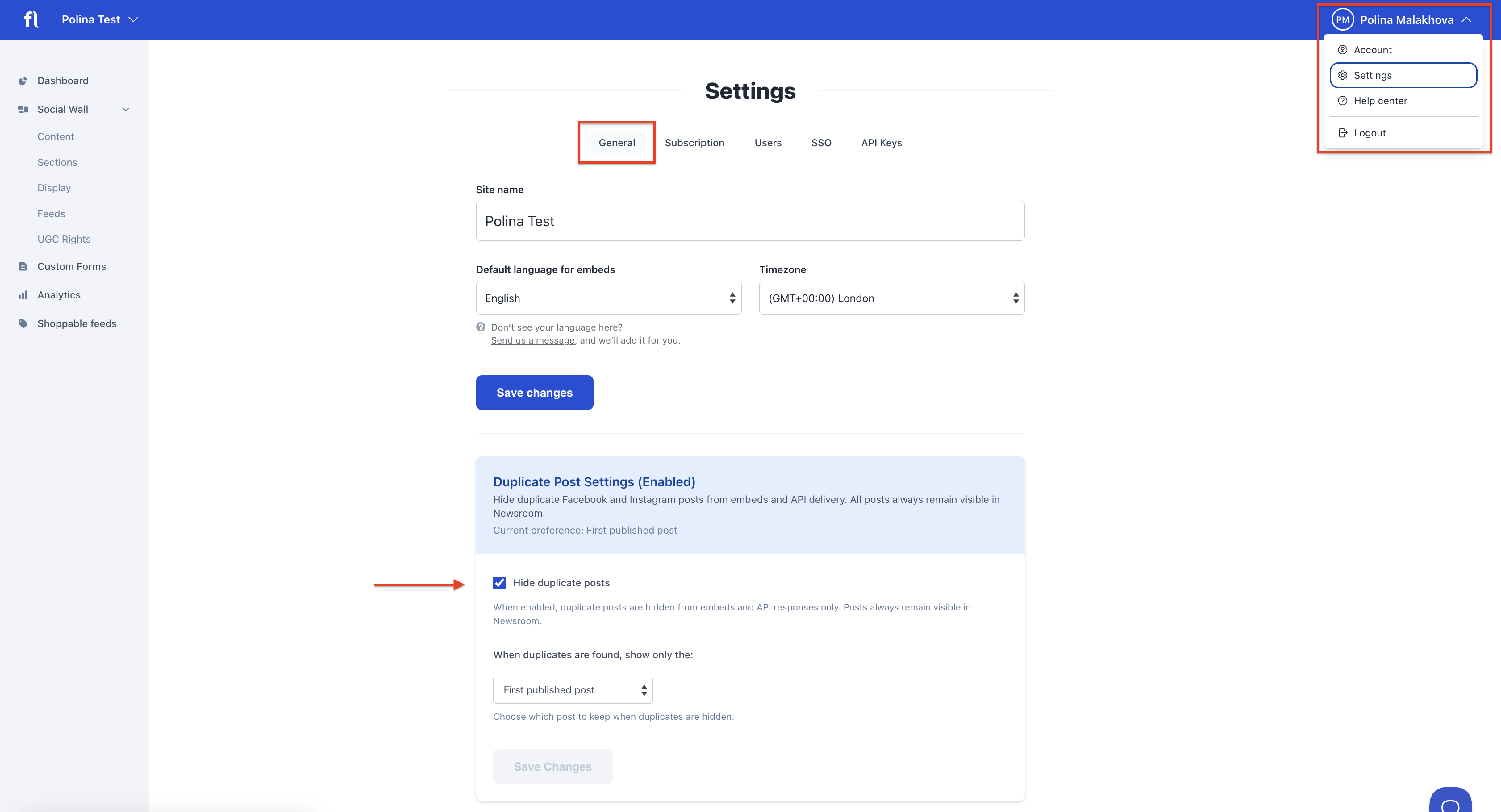
Go to Settings → General, and scroll down to Duplicate Post Settings.
What you can control
- Hide duplicate posts – A toggle that turns duplicate hiding on or off for your site. When enabled, Flockler detects posts with matching content coming from different connected sources and shows only one of them in your layouts.
- When duplicates are found, show only the:
- First published post (default) – keeps the post that was published earliest ⏮️
- Last published post – keeps the post that was published most recently ⏭️
Important things to know
- This feature is enabled by default for all Flockler accounts.
- This only affects layouts. All posts, including duplicates, always remain visible on your Content tab – nothing is deleted or hidden. The duplicate posts simply don't show up in the layout.
- You can toggle it on and off freely. If you turn duplicate hiding off and then back on later, it will pick up right where it left off. You won't need to redo anything or wait for posts to be reprocessed.
🙌 Need a Hand?
Our support team is here for you every step of the way.
💬 You can reach us via Messenger in the bottom‑right corner