
How do I subscribe to Flockler?
You can start your Flockler subscription at any time. All plans include a 14‑day free trial, and you can upgrade, downgrade, or cancel whenever you need.
How to subscribe
Create your Flockler account or log in to your existing one.
Go to the top‑right corner of the dashboard, click your name, and select Settings → Subscription

If you’re on a trial, you’ll also see a subscription banner at the bottom of your account.

Choose the plan and billing cycle that best fit your needs. Please note that Annual billing includes a 15% discount.
Our pricing is available here: https://flockler.com/plans-and-pricing
We support payments in USD and EUR.
For automatic credit‑card charges, we also support GBP. Please reach out to us to enable it.
Select your preferred payment method: credit card, SEPA, or bank transfer.
*Bank transfer comes with an additional processing fee of $/€10
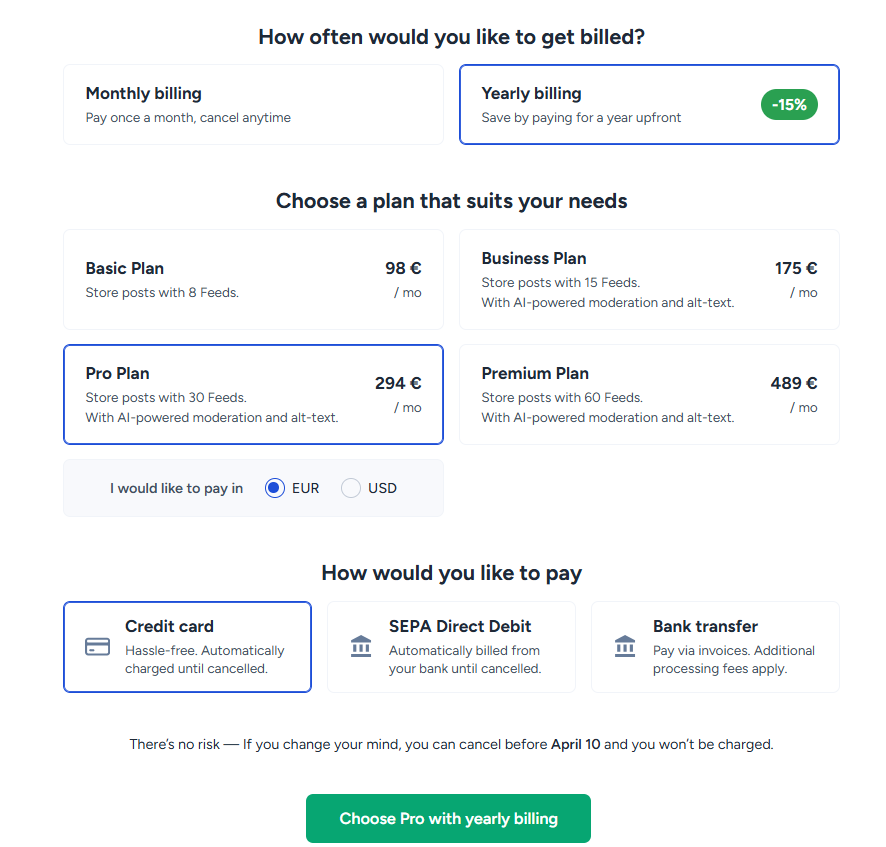
Confirm your subscription, and you’re all set. Your subscription activates immediately.
Under the 'Subscription' tab, you can access all your invoices and receipts, and update your payment method at any time.
Flexible billing
- You can switch plans whenever you need.
- If you upgrade mid‑cycle, you’ll only pay the difference.
- If you downgrade, the new price will apply from your next billing period.
Need help choosing a plan
If you’re unsure which plan is right for you, we’re happy to help.
Reach out via Messenger in the bottom‑right corner or email us at team@flockler.com