
Can I add content to Flockler manually?
If you want to add a few posts to an existing section, you do not always need to create a new feed; you can manually add additional content at any time.
To do so, open the ‘Content tab’, select the section you want to curate

And from Source choose the platform, for example, LinkedIn, and paste the link to the post you want to add, then ‘Search’, and ‘Publish.’
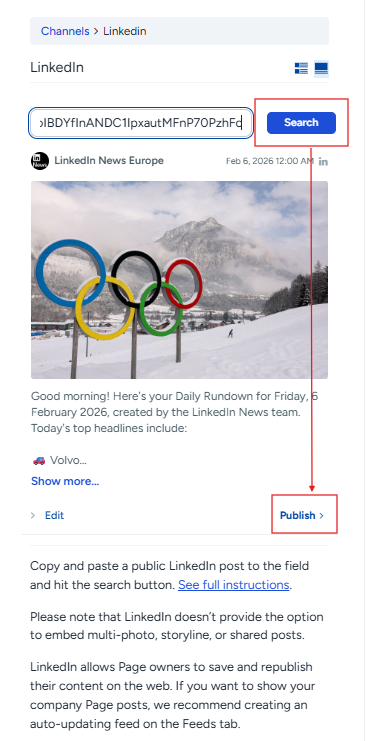
You can repeat this process for posts from any supported source.
If you need to add content that doesn’t exist on social media, you can manually upload an image and write a description. For this, choose ‘Custom post.’

The list of sources for adding content manually:
- Instagram - any public post
- Facebook - any public post from Facebook Pages you manage
- X (formerly Twitter) - any public post
- Bluesky - any public post
- LinkedIn - any public post, including public posts from Personal LinkedIn Pages
- YouTube - any public video
- TikTok - any public video, including videos from other public TikTok accounts
- Custom post - publish content in Flockler that isn’t tied to any social media channel and display it alongside your feeds
🙌 Need a Hand?
Our support team is here for you every step of the way.
💬 You can reach us via Messenger in the bottom‑right corner